
Uptivo: Track Workouts with Heart Rate Accuracy
Overview
Uptivo is a fitness-focused mobile application designed for Android users who want to monitor their workout progress outside of fitness club environments. The software enables users to track and store their exercise sessions, offering a structured way to maintain fitness routines and stay engaged with personal health goals. By integrating with chest and arm-based Uptivo heart rate sensors, the app delivers cardio frequency-based effort tracking, ensuring more accurate insights into training intensity.
Target users include fitness enthusiasts, gym members, and individuals committed to consistent physical activity. The app supports both casual users and those seeking competitive motivation through workout history and social sharing features. Real-world usage scenarios include tracking daily runs, strength training sessions, and interval workouts with real-time feedback based on heart rate data.
Developed by Uptivo, the software emphasizes accuracy and engagement in fitness tracking. The developer did not provide additional details about the company’s background or development philosophy. The app’s core purpose is to extend the value of club-based fitness programs by allowing users to continue monitoring their efforts independently.
Key Features & Capabilities
- Heart Rate-Based Effort Tracking – Uses compatible chest and arm-based Uptivo heart rate sensors to measure cardio effort in real time, providing a more accurate assessment of workout intensity than step or time-based tracking alone.
- Workout Session Monitoring – Records individual training sessions with detailed metrics, allowing users to review performance over time and adjust their routines accordingly.
- Workout History & Storage – Maintains a comprehensive log of past workouts, enabling users to analyze trends and track progress across weeks and months.
- Social Sharing Functionality – Offers a built-in option to share workout results with friends, promoting motivation and friendly competition.
- Engagement & Motivation Tools – Includes features designed to keep users committed to their fitness journey, such as visual progress indicators and session summaries that reinforce positive behavior.
These capabilities are particularly useful for users who rely on heart rate data to optimize their training zones. For example, a runner can use the app to ensure they remain within a target heart rate range during endurance runs. Similarly, a strength trainer may use it to monitor recovery and effort levels between sets.
User Interface, Workflow & Performance
The user interface of Uptivo appears to be designed with fitness tracking in mind, focusing on clarity and real-time feedback. Navigation is likely structured around core functions such as starting a workout, viewing history, and accessing settings. The workflow emphasizes simplicity, allowing users to begin a session with minimal steps once a heart rate sensor is connected.
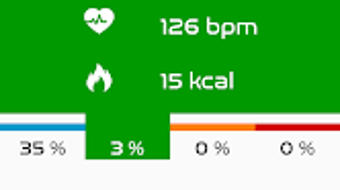
Given the app’s focus on real-time heart rate data, the interface probably displays key metrics like current heart rate, effort level, duration, and calories burned. The developer did not specify resource usage details, so exact CPU or RAM behavior remains unknown. Performance observations are based on general software behavior patterns for similar fitness applications.
Stability is expected to be consistent with standard Android app development practices, especially for a lightweight application. The app’s size of 15.7 MB suggests efficient resource usage, which may contribute to smoother operation on mid-range devices. However, actual performance may vary depending on device hardware and sensor connectivity.
Compatibility & System Requirements
Uptivo is designed exclusively for Android devices, with a current version of 1.0.1. The installation size is 15.7 MB, indicating a compact footprint suitable for most smartphones. The developer did not specify exact system requirements, such as minimum Android version or hardware specifications.
Compatibility information was partially provided. Users should ensure their Android device supports Bluetooth connectivity to pair with Uptivo heart rate sensors. The app is not available for iOS or desktop platforms at this time. For optimal performance, users are advised to use the latest version of the operating system and maintain stable sensor connections.
Pros and Cons
Pros
- Free to download and use with no subscription required
- Accurate effort tracking via compatible heart rate sensors
- Comprehensive workout history and progress tracking
- Supports social sharing to boost motivation
- Lightweight design at just 15.7 MB
Cons
- Android-only availability limits cross-platform use
- Exact system requirements were not listed
- Compatibility with third-party heart rate sensors is not confirmed
- No desktop or web version currently available
- App functionality depends on external hardware (heart rate sensors)
FAQ Section
Is Uptivo available for iOS devices?
As of now, Uptivo is only available for Android. There is no official iOS version released.
Does Uptivo require a heart rate sensor to function?
Yes, the app works with chest and arm-based Uptivo heart rate sensors. It does not support heart rate tracking through the phone’s camera or built-in sensors.
Is the app free to use?
Yes, Uptivo is completely free to download and use without any in-app purchases or subscription fees.
How often are updates released?
The app was last updated on May 15, 2024. The developer has not provided a scheduled update frequency.
Can I use Uptivo offline?
While the app likely stores workout data locally, real-time heart rate tracking requires an active Bluetooth connection to the sensor. Offline use may be limited to viewing saved workout history.
Final Thoughts
Uptivo delivers a focused, accurate solution for fitness tracking using heart rate data, making it a valuable tool for Android users committed to performance-based training. Its integration with Uptivo-branded sensors ensures reliable effort monitoring, while the free model removes financial barriers to entry.
Though limited to Android and dependent on external hardware, the app’s clean interface, progress tracking, and social features make it well-suited for fitness enthusiasts who value data-driven workouts. For users already invested in the Uptivo ecosystem, this app extends their training capabilities beyond the gym.
Download Uptivo now to take control of your fitness journey with real-time heart rate insights and detailed workout history.







